
How to Choose a Parenting Calendar App
Co-parenting can be challenging, but the right parenting calendar app can simplify custody schedules, communication, and responsibilities. Following a custody schedule implementation checklist can further ensure a smooth transition. These apps centralize everything - schedules, messages, and child-related details - into one platform, reducing misunderstandings and helping parents collaborate effectively. Some even offer court-admissible records, GPS check-ins, and AI-powered scheduling tools tailored to your family’s needs.
Key Steps to Choose the Right App:
- Assess Your Needs: Identify pain points, conflict levels, and custody priorities.
- Explore Features: Look for tools like color-coded calendars, secure messaging, and expense tracking.
- Consider Child-Specific Needs: Features like "Info Banks" for younger kids or Child Accounts for teens can be helpful.
- Check Compatibility: Ensure the app works well on both iOS and Android and is easy to use.
- Review Pricing: Options range from free to $250 annually, with premium features like court-admissible logs.
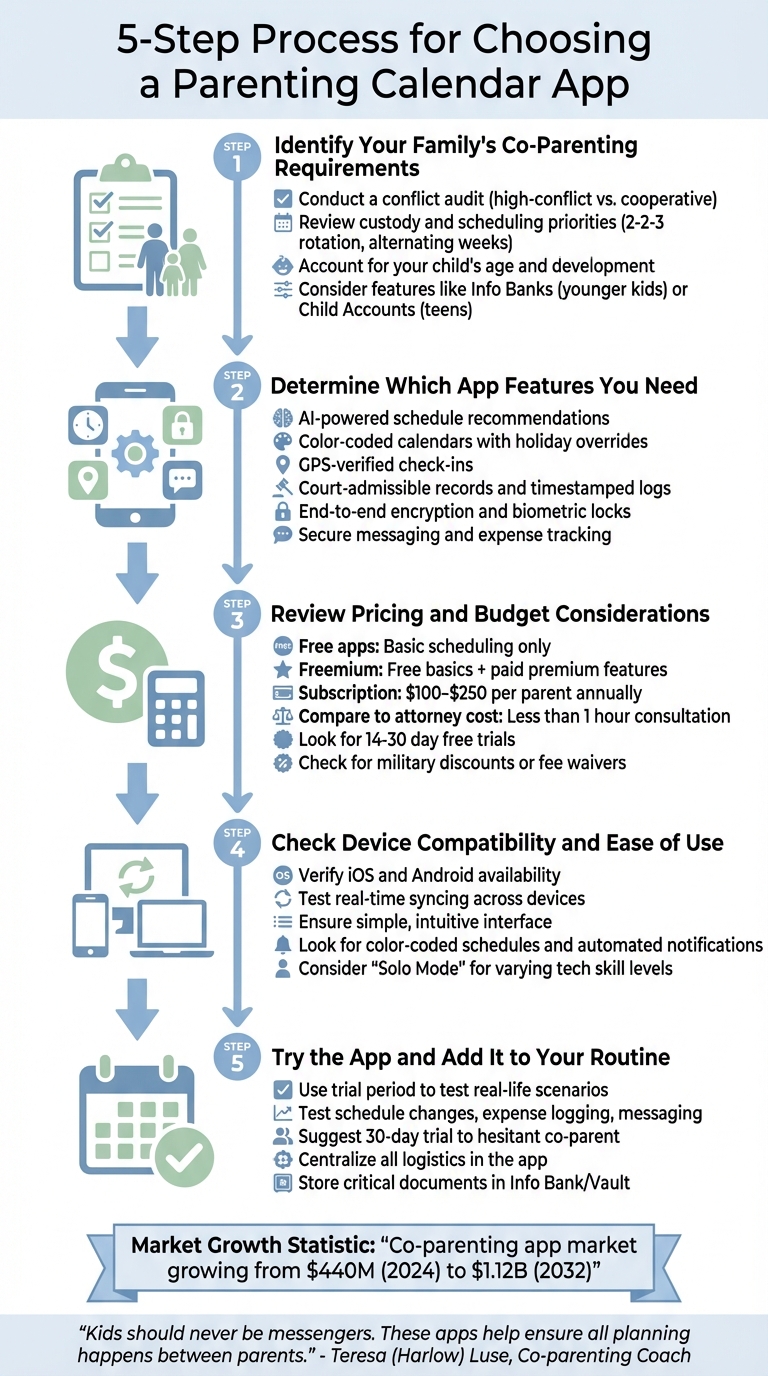
5-Step Guide to Choosing the Right Parenting Calendar App
Step 1: Identify Your Family's Co-Parenting Requirements
Before diving into app comparisons, take a moment to evaluate your family's co-parenting needs. Every family dynamic is different, so the best app for you might not be the one someone else swears by. As co-parenting coach and author Teresa (Harlow) Luse wisely advises:
"Think about what your biggest pain points are. Then match the app to those needs - not to an ideal scenario you wish existed."
Start by conducting a conflict audit. Are your logistical discussions calm and respectful, or do they often spiral into arguments? For families dealing with high-conflict situations, apps with features like court-admissible records, uneditable messaging, and timestamped logs can help avoid "he said/she said" disputes . On the other hand, if your relationship is more cooperative, simple tools designed for efficiency might be all you need.
Review Your Custody and Scheduling Priorities
Your custody arrangement plays a big role in determining which app features will be most useful. If you have a complex schedule - like a 2-2-3 rotation or alternating weeks - look for apps with color-coded calendars that make it easy to see each parent's days at a glance. Features like holiday overrides are also key, as they automatically adjust your schedule for school breaks, birthdays, or other special occasions without requiring manual updates .
For families managing tricky transitions, tools like GPS-verified check-ins and real-time location sharing can provide clear, verifiable records of punctuality at pick-ups and drop-offs . Once you've identified your scheduling needs, consider how the app can support age-specific custody schedules tailored to your child's development.
Account for Your Child's Age and Development
Your child's age and developmental stage should guide your choice of app features. Younger kids thrive on consistency, so features like "Info Banks" are invaluable. These allow parents to share essential details like daily routines, medication schedules, and allergy information seamlessly across households. For school-aged children, place alerts - such as notifications when "Alex arrived at school" - can cut down on constant messaging and help avoid misunderstandings about punctuality.
Teenagers, on the other hand, might benefit from having their own Child Account within the app. This gives them access to their schedules and lets them manage packing lists for weekend visits. If you're part of a blended family - like the 16% of U.S. children who are - look for apps with privacy settings that let you share specific information (like medical appointments) with your co-parent while keeping other household plans private .
sbb-itb-a09457a
Step 2: Determine Which App Features You Need
After identifying your family's needs, the next step is finding app features that align with those priorities. The right tools can shift your co-parenting approach from reactive problem-solving to proactive, collaborative planning. Here are some key features that can make a real difference.
AI-Powered Schedule Recommendations
One standout feature in parenting apps is AI-driven scheduling. Instead of relying on generic templates, these tools analyze your family's specific needs to recommend custody arrangements tailored to your situation. For example, Coflo allows you to adjust sliders for priorities like stability, equal parenting time, and school consistency. The app then generates personalized custody patterns, complete with insights from developmental psychology and cognitive development based on your child's age. Each recommendation comes with a clear breakdown of benefits, potential challenges, and a step-by-step plan for implementation - helping to reduce decision fatigue.
Some platforms go even further by summarizing messages, flagging compliance issues, and offering 24/7 AI support. This ensures you have immediate assistance for logistical or communication hurdles when they arise.
Adjustable Priorities and Age-Based Guidance
Effective co-parenting apps offer customizable tools that let you balance competing needs. With interactive sliders, you can prioritize factors like fewer transitions versus equal time with each parent, all based on logical, data-driven inputs rather than emotional debates. This approach encourages forward-thinking planning, creating a structured and lower-conflict environment that prioritizes your children's well-being.
These tools also let you adapt your custody plan in real-time, ensuring it stays consistent with your children's needs as they grow and circumstances change. By providing precise control over scheduling variables, such apps help create a stable, responsive co-parenting system.
Data Protection and Privacy Controls
Sharing sensitive information - like your child's medical records, school schedules, or family routines - requires strong security measures. Look for apps that offer end-to-end encryption, dual authentication, and biometric locks to keep your data safe.
Step 3: Review Pricing and Budget Considerations
Once you've identified the features you need, it's time to evaluate pricing models to ensure you're getting the best value for your money.
Understanding Subscription Plans and Free Options
Parenting calendar apps generally fall into three pricing categories: free, freemium, or subscription-only. Free apps are a good fit for co-parents with minimal conflict who just need basic scheduling tools. However, these apps often lack features like unalterable messaging or court-admissible records - both of which can be crucial in more complex situations. Freemium models allow you to use basic features for free while offering advanced tools, like recorded calls or certified documentation, through paid upgrades. Subscription-only apps, on the other hand, typically cost $100–$250 per parent annually - about the same as a single hour with a family law attorney.
Be aware of hidden costs, such as fees for individual features or requiring multiple subscriptions. These can significantly increase your overall expenses. Many premium apps include free trials (usually lasting 14 to 30 days) or money-back guarantees, giving you a chance to test their functionality before committing. Additionally, some platforms offer discounts for military families or fee waivers for those in financial need. Once you've accounted for these costs, think about how these tools can save you from more expensive disputes down the line.
Balancing Cost Against Long-Term Benefits
Although paid apps may seem like a significant upfront investment, they often help avoid much larger expenses in the future. Even the priciest co-parenting apps generally cost less than an hour-long consultation with a family law attorney. Features like tone analysis, tamper-proof logs, and integrated expense tracking can help prevent costly misunderstandings or scheduling conflicts.
It's important to understand what you're paying for. Premium plans often include court-admissible records with permanent, time-stamped documentation that attorneys and judges can easily review. For families dealing with high-conflict situations, these tools add a layer of accountability that basic calendars simply can't provide. Some apps, like Coflo, even go a step further by using AI to recommend custody schedules tailored to your family's needs. This offers research-driven solutions at a fraction of the cost of hiring a mediator or attorney for similar guidance.
Step 4: Check Device Compatibility and Ease of Use
Make sure the app works seamlessly on both parents' devices and is easy for everyone to navigate, regardless of tech skills.
Multi-Device and Platform Support
The app should be available on both iOS and Android, with web access as an added bonus. It’s also important that it syncs in real time across all devices. Look for "Available on" badges or platform details on the developer’s website to confirm compatibility. During the trial period (usually 14–30 days), test how well the app syncs and whether notifications are reliable. Once you’re confident in its multi-device support, evaluate the user interface to ensure it’s straightforward and easy to adopt.
Simple Interface for All Skill Levels
A straightforward design can make scheduling less stressful and help avoid miscommunication.
"Not everyone is tech-savvy. It's essential that both parents are comfortable using the selected app." - Cristina Egana, The Levey Law Group
Even the most feature-packed app won’t be helpful if it’s too complicated to use. Look for clean layouts and intuitive designs, especially ones that resemble familiar tools like standard phone calendars. Features like color-coded custody schedules and event-specific icons can make it easier to understand the schedule at a glance. Automated notifications for things like pickups, drop-offs, and appointments can also reduce mental strain and prevent misunderstandings.
Some apps include a "Solo Mode", allowing the more tech-savvy parent to manage records while sharing updates via text or email for the less tech-confident parent. Additionally, apps that let you invite third parties - like attorneys or grandparents - with view-only access can provide extra support for parents who are less comfortable with technology.
Step 5: Try the App and Add It to Your Routine
Once you've considered your needs, budget, and the app's compatibility, it's time to see how it performs in the real world. Testing the app in actual co-parenting scenarios will help you decide if it's the right tool for your family. Make full use of trial periods to explore its features and assess whether it truly eases coordination between households.
Use Trial Periods to Test Features
During the trial period, dive into the app's key features by mimicking real-life situations. Use it for tasks like requesting schedule changes, logging shared expenses (complete with receipt uploads), and sending messages. Pay close attention to how the app impacts communication. Does it act as a neutral middle ground, helping to formalize requests and reduce emotional tension? Does its timestamped, unalterable records help resolve "he said, she said" disagreements?
If your co-parent is reluctant to try the app, suggest a 30-day trial with no obligations. Emphasize that the goal is to streamline logistics for your child rather than impose monitoring. Another approach is to present two app options and let them choose which one to test - this can help foster cooperation by giving them a sense of control.
If the app proves effective in minimizing miscommunication and friction, move forward with fully incorporating it into your co-parenting routine.
Add the App to Your Custody Schedule
Once you've confirmed the app works well, make it a permanent part of your co-parenting system. Use it to centralize all parenting logistics, starting with your custody schedule. Many apps offer templates for common arrangements, like 2-2-3 rotations or alternating weeks, which you can customize to fit your needs. Layer in recurring commitments like school hours, sports practices, and extracurricular activities. For one-time events - like doctor visits, field trips, or birthday parties - log them as soon as they're scheduled.
To keep things running smoothly, agree with your co-parent to handle all non-urgent communication exclusively through the app. Log shared expenses immediately, complete with receipt photos, to maintain clear financial records. Take advantage of features like color-coding to quickly differentiate between parenting time, school events, and medical appointments. Additionally, use the app's "Info Bank" or "Vault" to store critical documents - insurance cards, medical histories, emergency contacts, and even clothing sizes - so both households have instant access to essential information.
"The biggest shift an app provides is moving your co-parenting dynamic from reactive to proactive." - Kidtime
Conclusion
Finding the right parenting calendar app involves a few simple steps: evaluate your family's unique needs, pinpoint the features that matter most, set a budget, confirm compatibility with your devices, and test the app before committing. Each step builds on the last, guiding you toward a tool that streamlines your co-parenting experience.
The goal is to choose an app that minimizes conflict and fosters stability. As co-parenting coach Teresa (Harlow) Luse explains:
"Kids should never be messengers. These apps help ensure all planning happens between parents".
By consolidating communication, expenses, and schedules into one neutral platform, these tools help keep children out of logistical disputes. Features like secure messaging, color-coded calendars, and GPS-verified check-ins encourage accountability and proactive planning. Beyond convenience, this approach models respectful collaboration, which provides children with the emotional security they need to thrive.
These tools don’t just simplify day-to-day coordination - they support long-term stability in co-parenting arrangements.
For parents just starting custody planning, tools like Coflo offer valuable guidance. Coflo, for instance, uses AI to provide recommendations based on priorities like stability, equal time, or school consistency. It also incorporates insights from developmental psychology tailored to your child's age. Once you’ve created a schedule that works, you can implement it using a calendar app that aligns with your family's communication style and budget.
The global market for co-parenting apps is expected to grow significantly, from $440 million in 2024 to $1.12 billion by 2032 . With options ranging from free platforms to premium services costing $100 to $250 annually , there’s a solution for every level of conflict and financial situation. Choosing the right app ensures a smoother co-parenting journey, laying the groundwork for a stable and predictable routine that prioritizes your child’s well-being.