
Affordable Co-Parenting Tools for Every Budget
Managing co-parenting logistics can be challenging, but digital tools make it easier by handling schedules, expenses, and communication. Whether you're in a low-conflict or high-conflict situation, there's an app for your needs - and your budget. From free tools like AppClose to premium options like OurFamilyWizard, these platforms help keep communication organized and reduce misunderstandings.
Key Takeaways:
- Free Tools: Options like Cozi and AppClose offer basic scheduling, messaging, and expense tracking at no cost.
- Under $10/Month: Apps like Splitwise Pro and Peacepath provide added features like receipt uploads and tone analysis.
- $10–$50/Month: Tools like TalkingParents and 2Houses offer court-admissible records, custody calendars, and expense management.
- Over $50/Month: Premium apps like OurFamilyWizard include advanced features like AI tone analysis, GPS tracking, and unlimited storage.
These tools simplify co-parenting and ensure children remain the focus. Start by identifying your needs, testing apps, and committing to consistent use.
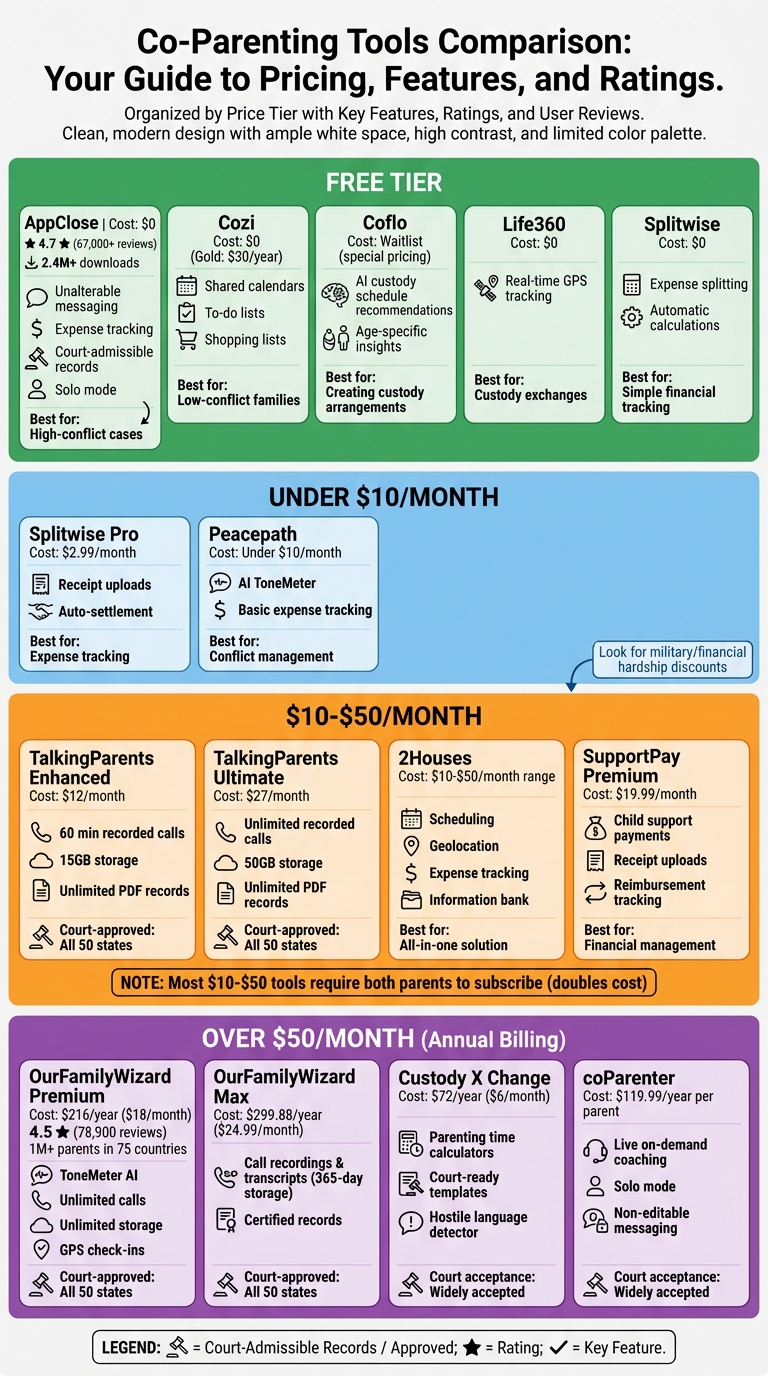
Co-Parenting App Comparison by Budget and Features
Free Co-Parenting Tools
Free tools can provide essential features like scheduling, expense tracking, and communication to help families explore what works best for their needs. Some tools are general family organizers, while others are tailored specifically for separated parents requiring legally reliable records.
Cozi
Cozi is a family organizer ideal for low-conflict co-parenting situations. It offers shared, color-coded calendars, to-do lists, and shopping lists that both parents can access via their phones or computers. Cozi can sync with major calendar platforms, making it easy to keep everyone on the same page. However, it's not designed for formal legal use, as it lacks unalterable message logs or certified records. The basic version is free, but you can upgrade to "Gold" for $30 per year to access extras like contact management and birthday reminders.
AppClose Free Version
AppClose is a standout option for co-parents, especially in high-conflict situations. Since its launch in 2016, it has been downloaded by over 2.4 million users, including co-parents and professionals. The app offers features like unalterable messaging, audio/video calling, expense tracking through its "ipayou" payment system, and shared calendars - all without subscription fees. It's widely trusted for legal documentation, and users can export records for court use. If one parent refuses to use the app, the "Solo" feature allows the other to independently track expenses and schedules while preserving timestamped records. With a 4.7-star rating from more than 67,000 verified users, AppClose is a reliable choice.
Coflo Waitlist Access
Coflo focuses on custody scheduling rather than daily coordination. This AI-powered platform helps parents create child-centered custody plans by analyzing priorities and offering personalized schedule recommendations. Users can adjust sliders for factors like stability, equal time, school consistency, and minimal transitions. Based on these inputs, Coflo generates ranked schedule options tailored to the family's needs. Each suggestion includes developmental psychology insights specific to the child's age, along with benefits, considerations, and an implementation guide. By providing research-backed guidance, Coflo offers a cost-effective alternative to traditional legal fees. Parents on the waitlist will also receive special pricing when the platform officially launches.
Life360
Life360 is a geolocation app that provides real-time location tracking, which can be particularly helpful during custody exchanges. This feature allows co-parents to monitor their child's location, easing anxieties and ensuring safer transitions between households.
Splitwise Free Tier
Splitwise simplifies managing shared expenses like medical bills, school fees, or extracurricular costs. It tracks who owes what and automates expense calculations, reducing the potential for disputes over financial matters.
| Tool | Primary Free Features | Best For |
|---|---|---|
| AppClose | Messaging, Calling, Expense Tracking, Calendar, Record Exports | High-conflict cases; Legal documentation |
| Cozi | Shared Calendar, To-Do Lists, Shopping Lists | General family organization; Low-conflict |
| Coflo | AI custody schedule recommendations, Priority sliders, Age-specific insights | Creating or modifying custody arrangements |
| Life360 | GPS Location Sharing | Safety during custody exchanges |
| Splitwise | Expense splitting and automatic calculations | Simple financial tracking |
These tools offer a solid starting point for co-parents, with options to upgrade to more advanced features as needed.
Tools Under $10/Month
If you're looking for co-parenting tools that go beyond the basics but won't break the bank, there are some great options under $10/month. These tools often include features like AI-driven conflict management and improved expense tracking, making co-parenting a little easier without premium costs. Here are two affordable choices that pack in useful features.
Splitwise Pro ($2.99/month)
Splitwise Pro is perfect for parents who need a simple way to track shared expenses. With features like receipt uploads and auto-settlement, you can snap photos of receipts to automatically log expenses. The auto-settlement function calculates who owes what and suggests payment timing, cutting down on unnecessary transactions. It’s especially handy for recurring costs like sports fees, tutoring, or insurance. However, keep in mind that it doesn’t include legal record-keeping. To cover all your co-parenting needs, consider pairing it with a custody scheduling app.
Peacepath Low Tier
Peacepath’s low-tier subscription focuses on keeping communication calm and child-centered. Its AI-powered ToneMeter analyzes messages for hostile language and suggests neutral alternatives, helping parents avoid escalating conflicts. This feature is particularly useful in high-conflict situations where inflammatory exchanges could lead to bigger disputes - or even legal issues. Along with tone analysis, it offers basic expense tracking, making it a helpful tool for managing both communication and finances in challenging co-parenting dynamics.
Tools Between $10–$50/Month
This price range offers comprehensive co-parenting solutions that are designed to handle court-ready documentation. These tools include unalterable messaging, recorded calls, expense tracking, and legal-grade records. Over 750,000 families rely on platforms like TalkingParents because they help eliminate "he said, she said" conflicts by creating a clear and accountable record.
Everything - messages, calls, and expense transactions - is timestamped and locked into certified PDFs that are admissible in courts across all 50 U.S. states. As Philip Lockwood, a co-parent, explains:
When we were using text or email, it was really hard to refer back to anything. With TalkingParents, I can easily do a search of our messages if I need proof of something for the other parent.
One thing to keep in mind: most platforms require both parents to have separate subscriptions, which doubles the cost. Additionally, advertised prices often assume annual billing. For example, OurFamilyWizard’s $12.50/month "Essentials" plan actually requires a $149.99 upfront payment. Before subscribing, check for military or financial hardship discounts, as many providers offer fee waivers.
Let’s take a closer look at some tools in this category.
SupportPay Premium ($19.99/month)
SupportPay Premium is a specialized tool for managing child support payments and reimbursement tracking. Users can upload receipts directly, categorize expenses (such as medical or school costs), and send or receive payments with automated balance updates. It also keeps detailed financial records, which can be crucial for proving payment history in legal situations. However, it lacks features like scheduling or messaging, so it’s best paired with another app for full co-parenting coordination.
2Houses
2Houses offers a wide range of features, including scheduling, geolocation, and expense tracking, all in one platform. Its color-coded custody calendar simplifies managing parenting time, while the geolocation feature documents attendance for pickups and drop-offs. The app also tracks shared expenses, stores receipts, and manages reimbursements. Additionally, it has a secure information bank for storing emergency contacts, medical records, and school schedules, reducing repetitive back-and-forth between parents. It’s a great choice for those seeking an all-in-one solution without paying for higher-end platforms.
TalkingParents
TalkingParents focuses on unalterable messaging with read receipts, as well as recorded and transcribed phone and video calls for undeniable documentation. Meghan Kelly, another co-parent, shares:
Because I'm able to regulate my responses and take a little bit more control of the communication with my ex-husband, my kids aren't suffering like they used to.
The Enhanced plan ($12/month) includes 60 minutes of recorded calls and unlimited PDF records, while the Ultimate plan ($27/month) offers unlimited recorded calls and 50 GB of storage. Both plans provide court-approved documentation and are often recommended by legal professionals as a cost-effective alternative to pricier options. Additionally, the Accountable Payments feature tracks expenses with receipt logs, and the shared calendar helps document custody exchanges.
| Feature | TalkingParents Enhanced | TalkingParents Ultimate | OurFamilyWizard Premium |
|---|---|---|---|
| Monthly Cost | $12 | $27 | $18 (annual billing) |
| Recorded Calls | 60 minutes/month | Unlimited | Unlimited |
| Storage | 15 GB | 50 GB | Unlimited |
| PDF Records | Unlimited | Unlimited | Unlimited |
| AI Tone Analysis | Not included | Not included | ToneMeter included |
| Payment Tracking | Accountable Payments | Accountable Payments | OFWpay with auto-splits |
sbb-itb-a09457a
Tools Over $50/Month or Annual Subscriptions
Premium tools in this category typically require annual subscriptions, with costs ranging from $72 to $300. These tools provide features like tamper-proof records, AI-driven tone analysis, and professional oversight. Many also offer fee waivers or military discounts to support families facing financial challenges.
Here's a quick comparison of premium tools, their pricing, and standout features:
| Tool | Annual Cost | Court Acceptance | Key Features |
|---|---|---|---|
| OurFamilyWizard (Premium) | $216/year ($18/month) | All 50 U.S. states | ToneMeter AI, unlimited calls, unlimited storage, GPS check-ins |
| OurFamilyWizard (Max) | $299.88/year ($24.99/month) | All 50 U.S. states | Call recordings & transcripts (365-day storage), certified records |
| Custody X Change | Starts at $72/year ($6/month) | Widely accepted | Parenting time calculators, court-ready plan templates, hostile language detector |
| coParenter | $119.99/year per parent | Widely accepted | Live on-demand coaching, "Solo" mode, non-editable messaging |
OurFamilyWizard
OurFamilyWizard is a standout option due to its widespread court acceptance and robust features. The Premium plan, priced at $216 per year, includes unlimited recorded calls, unlimited storage, and certified records that can be printed and notarized for court use. The Max plan, at $299.88 per year, adds call recordings and transcripts with one year of storage. Both plans also include ToneMeter, an AI tool that evaluates the tone of messages in real time and flags potentially aggressive language. Additionally, GPS-verified check-ins during custody exchanges help create a documented history of punctuality, which can be useful in legal situations.
Custody X Change
Custody X Change is designed for co-parents who need detailed parenting plans and precise custody calculations. Starting at $72 per year, this tool provides templates for court-ready custody agreements and includes a hostile language detector to flag inflammatory words in messages. It also offers visual tools to map out custody schedules and generates accurate parenting time reports, which can play a critical role in determining child support obligations.
coParenter
For parents seeking immediate guidance, coParenter offers live on-demand coaching from trained professionals. Priced at $119.99 per year per parent, it focuses on keeping communication centered on the child’s well-being. Its "Solo" mode ensures messages are non-editable and timestamped, creating a secure and reliable record that can be presented in court if necessary. This tool is ideal for those who want professional support to navigate complex co-parenting situations in real time.
How to Choose the Right Tool
Define Your Priorities
Start by identifying your family's specific needs. For high-conflict situations, tools with features like unchangeable, timestamped messaging and tone-checking - such as OurFamilyWizard or TalkingParents - can be crucial. If your case is low-conflict, a simpler scheduling tool might suffice. If legal oversight is part of the equation, make sure the tool complies with record admissibility standards.
Think about financial features as well. Do you need an integrated payment system for child support or expense reimbursements? Or will basic expense tracking meet your needs? Also, consider whether both parents will actively use the tool or if you’ll need a 'Solo Mode' option to manage communication on your own.
Evaluate Tools Based on Key Criteria
Compare tools by looking at factors like cost, features, privacy, and ease of use. For example, OurFamilyWizard boasts a 4.5-star rating from 78,900 reviews and is trusted by over 1,000,000 parents across 75 countries. Meanwhile, AppClose holds an impressive 4.7-star rating from over 67,000 verified users and is completely free.
Take advantage of trial periods to explore features. AppClose offers a 60-day trial, while OurFamilyWizard provides a 30-day money-back guarantee.
"Using co-parenting apps can decrease the friction between you and your ex over time, money and a host of other parenting issues." - Karen Covy, Divorce Coach and Lawyer
During the trial, try exporting a sample PDF of a conversation or expense log to ensure it meets your needs - or your attorney’s requirements. If cost is a concern, look into fee waiver programs offered by platforms like OurFamilyWizard and AppClose.
Once you’ve tested the tools and narrowed down your options, use them in real-life situations to see how well they work for you.
Steps to Get Started
Begin by downloading the app and experimenting with its main features. Add calendar events, log sample expenses, and send a few messages to get comfortable with how it works. If communication tends to be tense, test tone-checking features to help reduce potential conflicts.
When you're ready, share access with your co-parent and set clear expectations for how the tool will be used. If your co-parent refuses to participate, choose a tool with a 'Solo Mode' to document communication on your own. Also, think about whether others - like grandparents, attorneys, or mediators - will need access, and confirm the app allows for appropriate permission levels.
Conclusion
Selecting a co-parenting app comes down to finding one that aligns with your budget, conflict level, and specific needs. Whether you opt for a free option like AppClose or decide to invest in a paid platform like OurFamilyWizard at $99 per year, the key is choosing a tool that works for your situation.
These apps play a crucial role in keeping children out of adult conflicts. As co-parenting coach Teresa (Harlow) Luse wisely points out, "Kids should never be messengers. These apps help ensure all planning happens between parents". By reducing miscommunication and maintaining accountability, such tools create a more stable environment where children can thrive across two homes.
If you're still working through custody arrangements, platforms like Coflo offer AI-driven recommendations based on developmental psychology to help design child-centered custody plans. This can be especially helpful during the planning phase.
Take the time to define your priorities, explore trial periods, and test different apps in everyday situations. A small investment in the right tool can prevent misunderstandings, lower legal expenses, and, most importantly, safeguard your children's well-being.
The most important step? Commit to using the app consistently to ensure your children remain the focus of your co-parenting efforts.