How to Avoid Data Breaches in Co-Parenting Apps
Co-parenting apps store highly sensitive information like schedules, locations, legal documents, and private conversations. If this data is exposed, it can lead to serious risks, including stalking, harassment, or legal complications. Many apps lack end-to-end encryption due to court-access requirements, making them vulnerable to breaches. Here's how you can protect your family’s data:
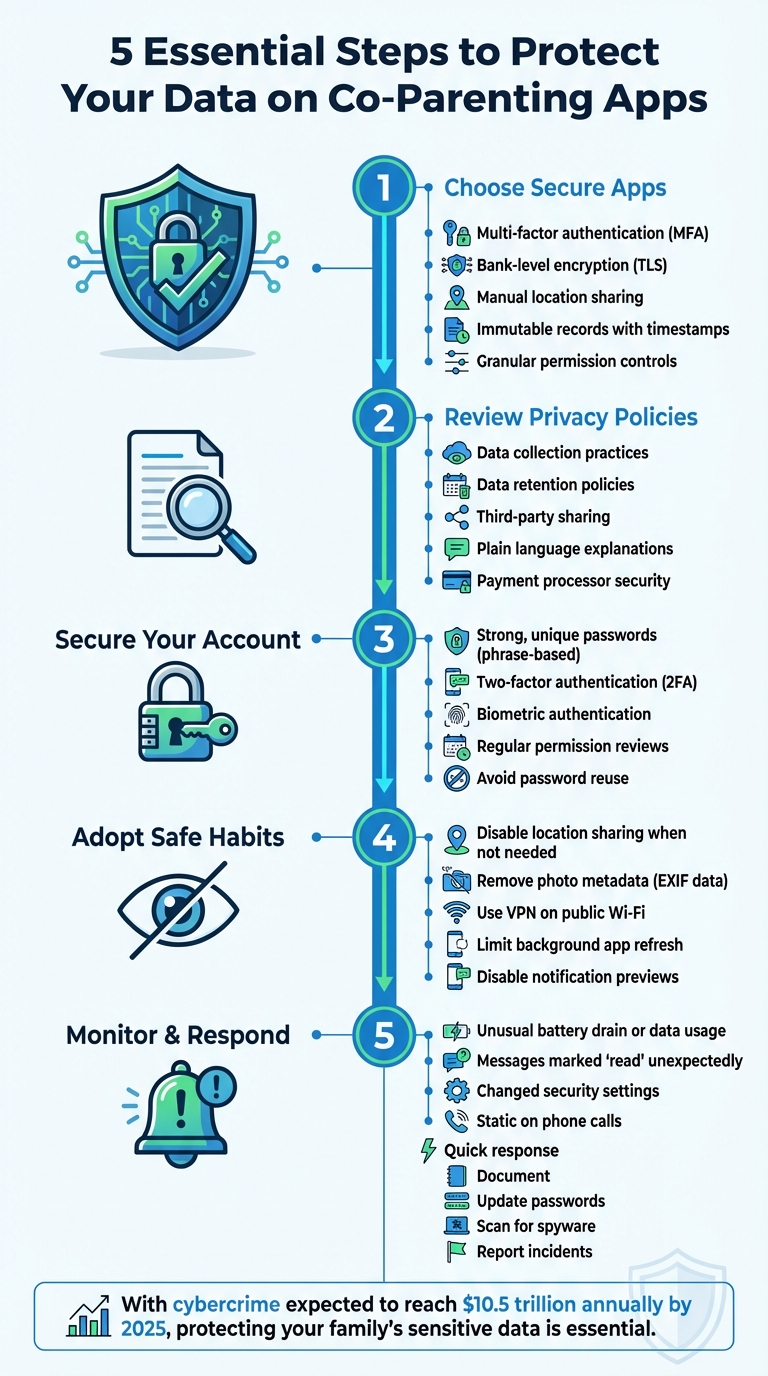
- Choose apps with strong security: Look for multi-factor authentication (MFA), encryption, and manual location sharing.
- Review privacy policies: Ensure the app limits data collection, retention, and sharing.
- Secure your account: Use strong passwords, enable two-factor authentication, and manage app permissions.
- Adopt safe habits: Disable location sharing, remove photo metadata, and avoid using public Wi-Fi without a VPN.
- Respond quickly to breaches: Monitor for unusual activity, update passwords, and report incidents to the app provider and law enforcement if necessary.
5 Essential Steps to Protect Your Data on Co-Parenting Apps
How to Choose Secure Co-Parenting Apps
When it comes to protecting your family's sensitive information, the first step is selecting the right co-parenting app. Not all apps are created equal, especially in terms of security. Before you download, it’s important to dig into their security features, privacy policies, and how they handle your data.
Security Features You Need
A solid co-parenting app should offer multi-factor authentication (MFA). This adds an extra layer of security by requiring a second verification step, like a code sent via text or an authenticator app. Even if someone guesses your password, MFA can help prevent unauthorized access.
Encryption is another must-have. Look for apps that use "bank-level" encryption, which ensures your data is protected both while it’s being transmitted (via TLS) and when it’s stored on the app's servers. Be aware, though, that some court-admissible apps may skip end-to-end encryption to allow for legal record generation, which could create vulnerabilities.
Another key feature is immutable records. Secure apps time-stamp messages and prevent editing or deletion, ensuring a reliable evidence trail for legal purposes. However, this also means that a breach could expose a detailed history of your communications.
Location privacy is equally important. Apps with constant GPS tracking can pose risks, especially in cases of domestic violence. Instead, choose apps that allow manual "check-ins" so you can share your location only when necessary. Also, confirm whether the app automatically removes metadata (like location and time) from shared photos and videos.
Finally, check for granular permission controls. These let you manage access to features like your camera, microphone, and location services. Privacy-conscious apps may also offer extras like biometric locks, PIN-enabled screens, and the ability to disable notification previews, keeping your data secure from prying eyes.
How to Review Privacy Policies
Security features are vital, but a clear and transparent privacy policy is just as important. This document should explain how the app collects, uses, and shares your data. If the policy is packed with legal jargon or vague terms, that’s a red flag. Instead, look for straightforward answers to questions like: What data does the app collect? Who can access it? How long is that data stored?
"The app's privacy notice should be written in plain language. Ideally, it should clearly describe: What permissions it requires... What data it collects... With whom it may share what data." - Safety Net Project
Pay close attention to data retention practices. Some apps follow a "never delete" policy to preserve court evidence, which means your records could be stored indefinitely, increasing the risk of exposure in a breach. Others allow you to delete data once a case is resolved, which reduces long-term risks.
If the app handles financial transactions, like child support payments, find out if it uses third-party payment processors. Reputable services like Dwolla may require sensitive information, such as Social Security Numbers, which could be at risk if the app is compromised. Also, check whether the app sells your data to advertisers. Subscription-based apps generally have less incentive to monetize your information compared to free versions.
Before committing, take advantage of the "Data Safety" sections in the Google Play Store or Apple App Store. These sections provide a quick overview of what data the app collects and shares with other organizations, helping you steer clear of apps with questionable practices.
Coflo's Privacy-First Approach

Coflo stands out by prioritizing privacy at its core. The app uses end-to-end encryption (AES-GCM) and client-side processing, meaning your custody planning data is encrypted directly on your device and remains unreadable - even to Coflo’s servers. Instead of relying on central servers, Coflo processes your settings and schedules locally on your device.
This approach eliminates the vulnerabilities associated with server-side systems. Even if a breach occurs, only scrambled, encrypted data would be exposed. Coflo also practices minimal data retention, storing only what’s essential for custody planning.
For families dealing with sensitive situations, such as domestic violence or high-conflict custody cases, Coflo offers peace of mind. Its design ensures your data stays in your control while still providing AI-powered custody recommendations and developmental insights - all without compromising your family’s privacy. This includes leveraging AI-generated custody schedules to minimize friction between parents.
sbb-itb-a09457a
How to Secure Your Account
Keeping your account safe is essential, especially when it involves sensitive co-parenting schedules or legal records. Even with a secure app, your account’s protection depends on the steps you take. Since co-parenting communications can sometimes become part of court proceedings, it’s crucial to prioritize security. Strengthen your account by using strong passwords, enabling two-factor authentication, and carefully managing app permissions.
Create Strong, Unique Passwords
Using dictionary words for passwords is risky. Steven Bradley, an FBI Academy graduate and law enforcement consultant, explains:
"Do not use dictionary words! It's very easy to get a program that runs through a dictionary and unlocks those passwords in minutes".
Instead, create passwords based on memorable phrases. For example, you can transform "You may say I'm a dreamer, but I'm not the only one" into "YmsIad,bInto1." Make sure to include at least one number and a special character. Avoid reusing passwords across accounts, especially if someone close to you might know your usual choices. To manage multiple complex passwords, consider using a password manager. If your app supports it, enable biometric authentication for added convenience and security.
Turn On Two-Factor Authentication
Two-factor authentication (2FA) adds an extra layer of protection by requiring a second step to verify your identity. Even if someone gets hold of your password through phishing or other means, 2FA can block unauthorized access. This additional step often involves a code sent via SMS, email, or an authenticator app. Jonathan D. Steele, a Chicago divorce attorney, emphasizes:
"Two-factor authentication significantly lowers the risk of unauthorized logins – users should enable 2FA by verifying a phone or email for added security".
Activate 2FA in your app’s security settings as soon as possible to protect your sensitive information.
Review App Permissions Regularly
Many apps request access to your camera, contacts, microphone, and GPS location, but not all of these permissions are necessary. Granting excessive permissions - like continuous location tracking - can put your privacy at risk, especially in sensitive situations. The National Network to End Domestic Violence highlights:
"Privacy is important and deeply connected to safety in situations where there may be abuse or stalking".
After installing an app, review its permissions in your device settings. For location access, choose "only while using the app" instead of "always." You can also limit background data sharing by disabling background app refresh. If an app insists on unnecessary permissions to function, consider it a warning sign and proceed with caution.
Safe Usage Practices
Protecting your data goes beyond securing your accounts - everyday habits can also play a big role. Simple actions, like posting a photo from your child’s soccer game or checking messages at a coffee shop, might unintentionally reveal more than you intended, such as your home address or routine. By tweaking a few settings and being mindful of what you share, you can lower the chances of exposing sensitive information.
Disable Location Sharing When Not Needed
Location tracking can give away personal details like where you live, work, or spend your time. According to the Safety Net Project, "An app feature that prompts a user to upload a location at a scheduled time presents more safety options than an app that requires location to be constantly on." Many co-parenting apps are designed to use GPS only when necessary - like during check-ins or tagging events - instead of tracking your every move.
To reduce location sharing, adjust your device settings. If you use an iPhone, go to Settings > Privacy & Security > Location Services, pick an app, and select "Never" or "While Using." You can also turn off precise location to share only a general area. On Android devices, open the app’s permissions and choose "Don’t allow" or "Only while in use." If you're in a sensitive or high-conflict situation, consider consulting a professional before making sudden changes to avoid raising concerns with others.
Remove Metadata from Photos Before Sharing
Every digital photo contains hidden data, known as EXIF metadata, which includes details like GPS location, timestamps, and even the camera used. Sharing images with this information could unintentionally disclose private locations, such as your child’s school or your new home.
Mary James from All About Cookies emphasizes, "EXIF data should be removed from any image you put online that could compromise your or your loved ones' safety. Unauthorized users don't need a roadmap to your kids' school."
Fortunately, removing metadata is quick and easy. On iPhone, tap the Share icon, select "Options" at the top of the share sheet, and toggle off "Location" before sending. Android users can use the "Remove location data" option in their gallery or apps like "Scrambled Exif" for more control. To prevent metadata from being added in the first place, disable location tags in your camera settings. Alternatively, taking a screenshot of the photo usually removes metadata, though it may slightly reduce the image quality.
Use a VPN on Public Wi-Fi
Public Wi-Fi, whether at a coffee shop, airport, or mall, is convenient but risky. These networks are often unsecured, leaving your data vulnerable. Steven Bradley, an FBI Academy graduate and law enforcement consultant, explains, "A VPN protects your phone or computer when you are on public wi-fi. If you're reading at Starbucks or walking around the mall using a public network, offenders can see everything you're doing."
A VPN acts like a shield for your online activity, encrypting your connection and hiding your IP address. This makes it much harder for anyone to intercept your data. Before using a co-parenting app or other sensitive services on public Wi-Fi, activate a VPN. Stick to trusted VPN providers and download them from official app stores. You can confirm the VPN is active by looking for its icon in your device’s status bar. However, even with a VPN, avoid entering sensitive information, like credit card details or child support payments, on public networks. While a VPN protects your connection, it won’t safeguard your device if spyware is already installed - so enabling biometric logins and two-factor authentication adds an extra layer of security.
How to Detect and Respond to Data Breaches
Even the best security measures can falter, but catching breaches early and acting quickly can limit the damage. Recognizing warning signs and having a response plan in place can go a long way in protecting your personal information.
Watch for Unusual Account Activity
The earliest clues of a breach often come from strange behavior on your device or account. For instance, if your smartphone overheats, its battery drains unusually fast, or your data usage suddenly spikes, these could point to spyware or cloning issues. Steven Bradley, a law enforcement and legal technology consultant, warns:
"If you suspect your co-parent knows too much about your day-to-day, it is possible that they're monitoring your activities or devices".
Keep an eye on your account activity. Signs like messages marked as "read" when you haven't opened them or changes to your security settings - like recovery emails or security questions - are red flags. Another trick? Compare your app's messaging logs to your phone bill. Any mismatch might indicate spoofing. And if you hear static about a minute into phone calls, it could suggest someone is eavesdropping.
| Sign of Breach | How to Identify |
|---|---|
| Spyware/Cloning | Unusual data usage, overheating, or rapid battery drain |
| Spoofing | Discrepancies between app message logs and carrier phone bills |
| Unauthorized Access | Messages marked "read", altered recovery settings, or changed security questions |
| Eavesdropping | Static noise about 60 seconds into phone calls |
If you notice any of these signs, take action immediately to secure your account.
What to Do After a Suspected Breach
Once you suspect a breach, acting swiftly can help reduce further harm. Start by documenting everything - note the date, time, and details about the compromised information. Sarah Thompson, a digital privacy expert, advises:
"Keep detailed records of the breach, including dates, times, and the nature of the information compromised".
Next, update your passwords for the affected app and any linked email accounts. Use a strong, unique password and update your security questions with answers that your co-parent or others wouldn’t easily guess - avoid common ones like your first car or elementary school. Enable two-factor authentication and consider biometric locks like Face ID or fingerprint scans for added security.
If you suspect spyware, run a scan using trusted tools like Avast One, Norton, or McAfee. Save screenshots of any detected threats, as they could be useful in legal proceedings. Keep in mind, a factory reset might not fully remove spyware if it reloads from cloud backups. In such cases, contact your mobile carrier for a thorough inspection. You should also disable unnecessary location services and Bluetooth to reduce monitoring risks.
Once your account is secure, the next step is reporting the breach.
How to Report Security Incidents
After securing your account, report the breach to the app provider. Check their privacy policy to understand your rights, and request a formal report outlining the exposed data and corrective actions taken. Reporting promptly not only helps protect your privacy but also supports the accuracy of custody records.
If you find evidence of spyware or cloning, reach out to your mobile carrier - they can often confirm and document malicious software. For physical trackers, like AirTags, that your phone detects, the advice is clear:
"If you suspect a tracker and your phone detects one, contact law enforcement".
Since breaches can affect custody arrangements, it’s wise to consult a family law attorney. They can guide you on your rights and any legal steps you might need to take. Additionally, you might consider requesting that government agencies restrict access to your public records to reduce the risk of further data scraping.
Conclusion
Keeping your family's data secure on co-parenting apps is about more than just privacy - it’s about protecting legal rights and ensuring your children’s safety. With cybercrime expected to hit a staggering $10.5 trillion annually by 2025, the information stored on these platforms - like schedules, home addresses, and school records - could become a target for harassment or even stalking if mishandled.
The good news? Many breaches can be avoided with simple precautions. Use two-factor authentication, create strong and unique passwords, regularly check app permissions, strip GPS metadata from photos, and always use a VPN when connected to public Wi-Fi.
It's also worth remembering that co-parenting apps serve as a permanent record, meaning every message could potentially show up in court. As Jonathan D. Steele, a Chicago divorce attorney, wisely notes:
"In an era where privacy and family dynamics intersect, vigilance is not just a choice; it's a necessity".
If you suspect a breach, act fast: document what happened, update your passwords, scan devices for spyware, and report the issue to both the app provider and law enforcement.